
Introduction · 9 min read
Passwords: The Foundation of Authentication—and Its Security Limits
How password authentication works, why guessing, reuse, credential stuffing, and phishing remain dangerous, and how password managers and additional factors reduce—but do not eliminate—those risks.
Passwords are only one component of an authentication system, but they remain its most familiar form.
Most sign-in journeys still begin with a simple question:
What secret do you know?
The usual answer is a password.
Passwords are a knowledge factor—something the user knows. Their low deployment cost, compatibility with almost every device, and decades of familiarity have made them fundamental to online authentication.
Those same advantages also create a persistent human problem: people may have dozens or hundreds of accounts, but human memory is poorly suited to maintaining a different, long, unpredictable secret for every service.
That tension between security and memorability explains many of the weaknesses associated with passwords.
What does a password actually prove?
When a service accepts the correct password, it does not prove a person’s physical identity.
It demonstrates that the party attempting to authenticate knows the secret associated with the account.
That distinction matters because anyone who learns the secret may be able to use it.
A legitimate user can type the password.
So can an attacker who guessed it, obtained it from a breach, captured it with malware, or convinced the user to enter it into a phishing page.
This is the central limitation of password authentication:
The system can verify the secret, but the secret itself does not reveal who is using it.
The security objective is therefore to make the secret difficult to discover and difficult to reuse if it is exposed.
How does a service verify a password?
A properly designed service should not store a user’s password as readable text.
Instead, when the password is created or changed, the verifier processes it using a password-hashing scheme together with a unique random salt and a computational cost factor.
The service stores the resulting verification value, not the original password.
At sign-in, the submitted password is processed again with the appropriate parameters. If the resulting value matches the stored verifier, the password check succeeds.
The salt does not need to be secret. Its purpose is to ensure that identical passwords do not automatically produce identical stored values across accounts and to make large-scale precomputation attacks less useful.
The computational cost is also important. A suitable password-hashing scheme is intentionally expensive enough to make repeated guessing costly while remaining practical for legitimate verification.
Current NIST guidance requires password verifiers to store centrally verified passwords in a form resistant to offline attacks, using salted password hashing with an appropriate cost factor.
Online guessing and offline guessing are different
Password guessing can happen in two very different environments.
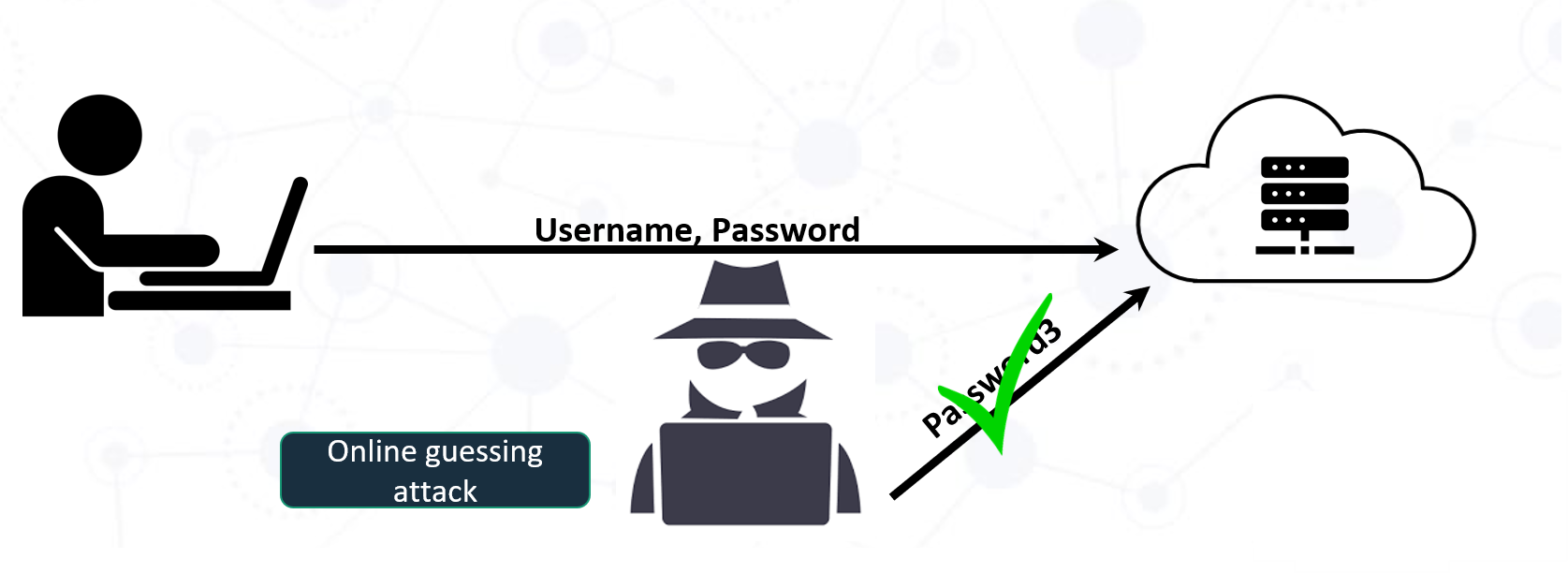
Online guessing
In an online attack, the attacker sends password guesses to the real authentication service.
The service can observe those attempts and apply protections such as:
- rate limiting,
- temporary delays,
- account or risk-based controls,
- detection of unusual login behavior,
- and blocklists that prevent users from selecting passwords known to be common or compromised.
These controls restrict how many guesses an attacker can make through the normal login interface.
Offline guessing
An offline attack begins after an attacker obtains password-verification data from a compromised database or system.
The attacker can then test guesses locally without sending every attempt to the real service.
This changes the economics of the attack.
The service’s normal rate limits no longer protect each guess. Security instead depends heavily on the strength of the user’s password and on how expensive the stored verifier makes each offline attempt.
A weak or highly predictable password can therefore remain vulnerable even when the service uses proper salted hashing.
Why do passwords fail in practice?
Predictable choices
People tend to choose secrets they can remember.
Attackers exploit the same predictability.
Guessing tools prioritize passwords from previous breaches, common words, keyboard patterns, names, dates, and familiar modifications such as adding a number or symbol.
A password such as a common word followed by 1! may satisfy an old-style composition rule without providing much real resistance to guessing.
This is one reason modern guidance has moved away from forcing users to include arbitrary combinations of uppercase letters, lowercase letters, digits, and symbols.
Password reuse
Even a strong password becomes dangerous when the same credential is used across multiple services.
Suppose Service A is breached and a user’s credentials are exposed.
An attacker can then try the same username and password at Services B, C, and D.
This is credential stuffing.
The attacker does not need to break the cryptography of the other services. Password reuse turns a compromise in one place into an authentication opportunity somewhere else.
A unique password for every account limits that cascade.
Phishing
Attackers do not always need to guess anything.
A phishing site can imitate a real sign-in page and ask the user to provide the password directly.
If the user submits the secret, password strength becomes irrelevant: the attacker has obtained the correct value.
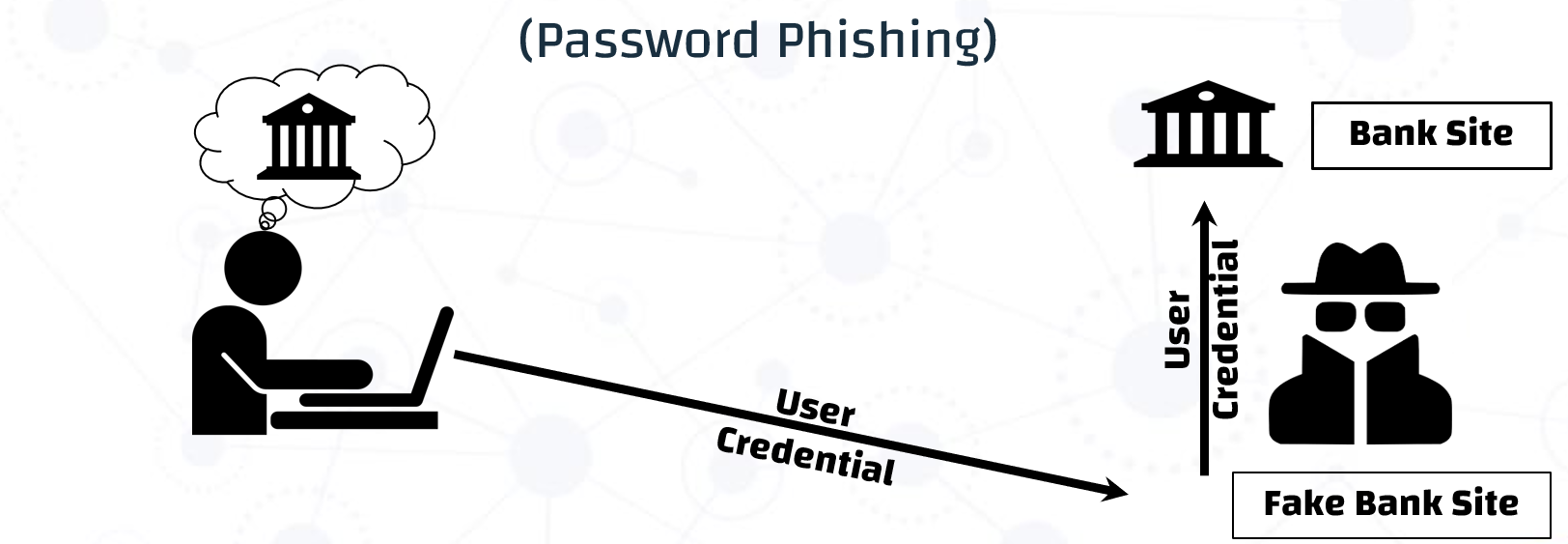
A phishing page turns the interface—not the password itself—into the point of failure.
NIST explicitly classifies passwords as not phishing-resistant.
Malware and compromised endpoints
A strong password also cannot protect an endpoint that exposes the secret before or while it is used.
Malware, malicious browser extensions, keyloggers, or a compromised application may be able to capture credentials or manipulate the authentication flow.
This reinforces the broader lesson from the previous article: authentication security depends on the system surrounding the authenticator.
What does modern password guidance recommend?
Password advice has changed significantly from the familiar rules many users grew up with.
Current NIST SP 800-63B-4 guidance for centrally verified passwords emphasizes length, blocklisting, rate limiting, and safe storage rather than arbitrary complexity rules.
For service providers, the guidance includes several important principles:
- Passwords used as a single authentication factor must be at least 15 characters.
- A shorter minimum can be used when a password is part of multi-factor authentication, but it must still be at least 8 characters.
- Services should permit passwords of at least 64 characters.
- Verifiers should reject passwords that appear in blocklists of commonly used, expected, or compromised values.
- Services should not impose arbitrary composition rules such as requiring a fixed mixture of character classes.
- Passwords should not be changed periodically without a reason; a change should be required when there is evidence of compromise.
- Password managers, autofill, and paste functionality should be allowed.
For users, the practical lesson is simpler:
Use a long, unique password for each account, and do not rely on memory to manage all of them.
Password managers change the problem
Password managers address one of the hardest usability problems in password authentication: people cannot reasonably memorize a large collection of strong, unique passwords.
A password manager can generate high-entropy credentials and associate each one with the appropriate service.
This provides two major benefits.
First, generated passwords are less likely to follow predictable human patterns.
Second, unique passwords prevent one breached credential from automatically being useful at another service.
Autofill can also reduce the need to manually type credentials and, when correctly bound to the intended web origin, can help users avoid entering credentials into some phishing pages.
But password managers are not automatically perfect.
Different architectures introduce different tradeoffs involving:
- where encrypted credentials are stored,
- how the password manager itself is unlocked,
- synchronization between devices,
- recovery,
- device compromise,
- service compromise,
- and the trust placed in the password-management provider.
Our analysis in ACM Computing Surveys evaluated password managers and two-factor authentication across usability, deployability, security, and privacy. The comparison shows why password management should not be reduced to a simple claim that one product or architecture is universally best.
The right question is again a system question:
Which risks does this design reduce, and which risks remain?
Why passwords still need another layer
A password manager can make password guessing and reuse substantially harder.
It does not make the password authentication model phishing-resistant in every situation, and it cannot guarantee protection if an attacker compromises the endpoint, steals an authenticated session, or defeats the password manager itself.
This is where an additional authentication factor can change the attacker’s requirements.
Our ACM survey found that combining a password manager with two-factor authentication can provide a stronger balance of security and usability than password-only authentication or either mechanism considered alone, provided the implementation addresses the weaknesses of both components.
The password manager helps with credential generation, uniqueness, and usability.
The second factor raises the barrier after the password has been exposed.
Neither should be treated as magic.
Together, however, they can address different parts of the threat model.
Research connection: can we avoid storing account passwords?
Conventional password managers generally protect a collection of account passwords and make those credentials available when needed.
Our work on the Hidden-Password Online Password Manager (HIPPO) explores a different architectural question:
Can a password manager support strong, site-specific passwords without learning or storing the user’s master password or account passwords?
The original HIPPO work, published at the ACM Symposium on Applied Computing, proposed generating a unique high-entropy account password as a function of the user’s master password and a service-specific cryptographic key.
Our later work in IEEE Transactions on Information Forensics and Security extended and experimentally evaluated this architecture.
The objective is not to claim that one architecture solves every password problem. It illustrates a more general design principle:
Where and whether credentials are stored changes the system’s threat model.
That issue becomes increasingly important as password managers become central components of digital identity systems.
Better password practice
For most users, a practical baseline is:
- Use a unique password for every account.
- Prefer long passwords rather than trying to satisfy arbitrary character tricks.
- Use a trusted password manager to generate and manage credentials.
- Enable multi-factor authentication (MFA) when available.
- Prefer phishing-resistant authenticators such as security keys or passkeys when the service supports them.
- Treat unexpected sign-in links and prompts with caution.
- Change a password when there is evidence that it has been exposed or compromised, not simply because a calendar says it is time.
Takeaway
Passwords remain deeply embedded in digital authentication because they are inexpensive, familiar, and broadly deployable.
Their weaknesses are equally well established.
The password can be guessed.
It can be reused.
It can be phished.
It can be captured.
And even when it is strong, the surrounding authentication system may still fail somewhere else.
The goal is therefore not to search for a magically perfect password.
It is to build a stronger authentication system around the password: secure verification by the service, unique credentials for the user, a trusted way to manage those credentials, and additional authentication protection appropriate to the risk.
That leads naturally to the next question:
What changes when authentication requires more than one factor?
The next article examines multi-factor authentication, what a second factor actually adds to the threat model, and why not all forms of MFA provide the same protection.
References
Discussion & Questions
Continue the conversation.
Have a question, a different perspective, or practical experience related to this topic? I welcome thoughtful discussion around the ideas and evidence presented in this article.